 BarShelf
BarShelf › Widgets › Developer Inbox
Developer Inbox
GitHub review requests and unread notifications in one private, actionable inbox with dedicated setup, empty, and partial-failure states.
- Category
- Developer
- Type
- TypeScript script
- Requires
- gh CLI + Deno
- Permissions
- exec:
/opt/homebrew/bin/gh,/usr/local/bin/gh - Refresh
- Every 5 min while visible
- Source
- github.com/Open330/barshelf/tree/main/widgets/developer-inbox
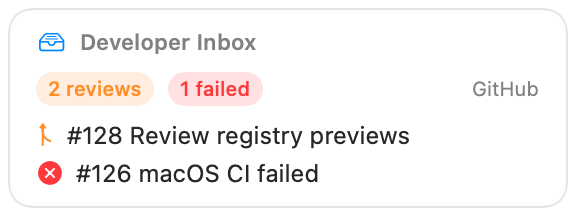
A private GitHub attention dashboard for BarShelf. It combines pull requests that request your review with unread GitHub notifications and opens each item in the browser.
Requirements
- Install GitHub CLI at a standard Homebrew path (
/opt/homebrew/bin/ghon Apple Silicon or/usr/local/bin/ghon Intel). - Authenticate once with
gh auth login. - Approve the widget's exact
ghexecutable permission.
No token is requested or stored by the widget. It reuses the GitHub CLI's existing authenticated session and makes no direct network request.
Privacy and failure behavior
- Command output can contain private repository names, PR titles, and account details. Every
ghcommand and render is marked sensitive, and the persisted cold-start view is a generic redacted placeholder. - The allowlist contains only version/auth checks, a fixed review-request query, and a fixed notifications query. Arbitrary
gharguments cannot be run. - Missing CLI, missing authentication, empty inbox, partial API failure, and successful data states each have a dedicated UI instead of surfacing raw command errors.
- Refreshes happen on open, every five minutes while visible, and after wake.
Use widget settings to show 3–10 items per section or hide notifications.
Install
Included with BarShelf. Open the popover, go to the Gallery, and add it. BarShelf asks you to approve the permissions listed above first.
brew install --cask open330/tap/barshelf