 BarShelf
Network
Native upload and download activity with optional live speeds, local address, and an interface selector. No subprocess or external dependency.
- Category
- System
- Type
- Workflow (no code)
- Requires
- Nothing beyond BarShelf
- Permissions
- system:
network - Menu bar
- Can show its value live in the menu bar
- Refresh
- Every 2 s while visible
- Source
- github.com/Open330/barshelf/tree/main/widgets/network
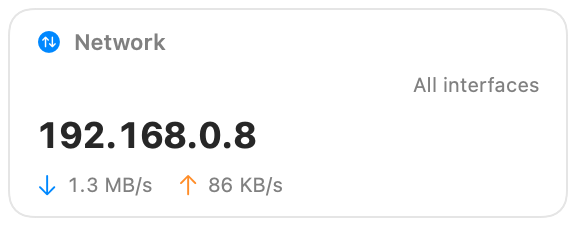
Native upload and download activity for BarShelf, with your local address and an optional live speed readout in the menu bar. It reads the system's network counters directly: no subprocess and no external tools.
What it shows
- The interface being measured, or "All interfaces".
- Your local IP address.
- Current download and upload rates, scaled to B/s, KB/s, MB/s, or GB/s.
The first sample has nothing to compare against, so rates show "—" until the second refresh instead of a misleading zero.
Settings
| Setting | Default | Effect |
|---|---|---|
| Menu bar shows | Activity | Two activity dots, or both speeds as text. |
| Network interface | all | Measure every interface, or one such as en0. |
Permissions and refresh
The widget uses the built-in network system source. It refreshes every two seconds while visible. Clicking it opens Network settings.
Install
Included with BarShelf. Open the popover, go to the Gallery, and add it. BarShelf asks you to approve the permissions listed above first.
brew install --cask open330/tap/barshelf