 BarShelf
BarShelf › Widgets › Next Meeting
Next Meeting
Your next macOS Calendar event with time remaining, location, and a one-click Join button for Zoom, Meet, Teams, Webex, and other meeting links.
- Category
- Productivity
- Type
- TypeScript script
- Requires
- Deno runtime
- Permissions
- exec:
/usr/bin/osascript - Refresh
- Every 60 s while visible
- Source
- github.com/Open330/barshelf/tree/main/widgets/next-meeting
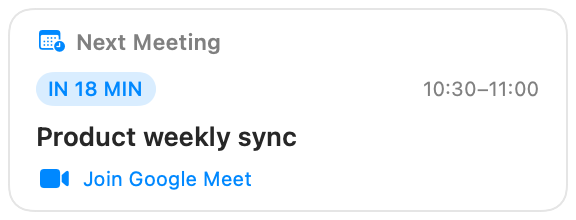
See the next event from macOS Calendar without opening the app. The widget shows the event title, its calendar, time, time remaining, and location. When Calendar contains a Zoom, Google Meet, Teams, Webex, or other HTTP(S) URL, a Join button appears automatically.
Setup
- Add the widget and approve its single declared command:
/usr/bin/osascript -l JavaScript ./calendar.js <days> <all-day>. - On the first refresh, macOS may ask for Calendar automation access. Approve it in System Settings → Privacy & Security → Automation.
- Use widget settings to choose a 1–30 day search window and whether all-day events should be included.
Event output is marked sensitive. BarShelf receives only the nearest matching event and persists a redacted fallback instead of the title or location.
Files
widget.jsondeclares the script runtime, refresh behavior, settings, and the exactosascriptallowlist shape.calendar.jsis a local JXA query executed by macOSosascript.index.tsformats the result and renders native BarShelf nodes.
Install
Included with BarShelf. Open the popover, go to the Gallery, and add it. BarShelf asks you to approve the permissions listed above first.
brew install --cask open330/tap/barshelf