 BarShelf
BarShelf › Widgets › Recent Files
Recent Files
Stashbar-style recent files with a Grid/List view toggle and adjustable thumbnail size. QuickLook thumbnails that drag out to Finder/apps and open on click. Inspired by https://github.com/jiunbae/stashbar.
- Category
- Files
- Type
- Workflow (no code)
- Requires
- Nothing beyond BarShelf
- Permissions
- readPaths:
~/Downloads - Source
- github.com/jiunbae/stashbar
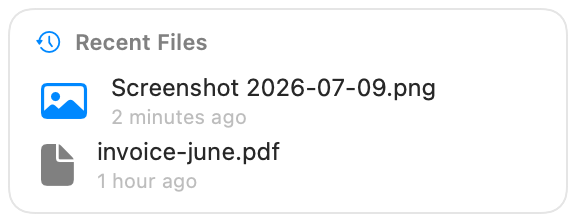
The newest files in a folder as QuickLook thumbnails, in a grid or a list. Drag a file straight out to Finder or another app, or click it to open it. Inspired by Stashbar.
What it shows
- The folder name and how many files are listed.
- The newest files first, with real QuickLook thumbnails.
- Grid tiles or list rows with names and dates, whichever you pick.
The widget watches the folder, so a new download appears without waiting for the next refresh.
Settings
| Setting | Default | Effect |
|---|---|---|
| Folder | ~/Downloads | Which folder to show. |
| Maximum files | 24 | How many of the newest files to list. |
| View | Grid | Grid of thumbnails, or a list. |
| Thumbnail size | 52 | Thumbnail size in points. |
Permissions
The widget asks for read access to the chosen folder. Hidden files are skipped.
Install
With BarShelf running, install it in one click, or from the terminal:
barshelf install https://github.com/jiunbae/stashbarDon't have BarShelf yet?
brew install --cask open330/tap/barshelf